Skip to content

Why Your Emails Land in Spam: SPF, DKIM, DMARC and the 0.3% Rule, Explained Simply

Great emails are worthless in the spam folder. Here is what SPF, DKIM and DMARC actually do, the rules Gmail, Yahoo and Outlook now enforce, and a checklist to protect your sending domain.

Email deliverability guide cover explaining SPF, DKIM, DMARC and the 0.3% Gmail spam rate limit, by Iftaykhar Mahmud
On this page
  1. The three records behind email deliverability
  2. The sender rules Gmail, Yahoo and Outlook now enforce
  3. The 0.3% rule for email deliverability
  4. Protect your main domain from cold outreach
  5. Autoresponders: the risk nobody thinks about
  6. What this means for a growing business

Short answer

Email deliverability is your ability to land in the inbox rather than spam. It depends on authentication (SPF, DKIM and DMARC records that prove you are allowed to send for your domain) and on reputation, mainly how often people mark you as spam. Gmail asks senders to stay below a 0.1% spam rate and never reach 0.3%.

Key takeaways

  • SPF lists the servers allowed to send for your domain, DKIM signs each message, and DMARC tells inboxes what to do when those checks fail.
  • Since February 2024, Gmail requires SPF, DKIM and DMARC for anyone sending 5,000 or more messages a day to Gmail accounts, plus one-click unsubscribe for marketing mail.
  • Outlook.com began enforcing similar authentication rules for high-volume senders on 5 May 2025.
  • Keep spam complaints below 0.1% and never let them reach 0.3%. Send cold outreach from a separate domain.
Earlier this year the contact form on this very website stopped delivering enquiries. The form looked fine. Visitors saw a normal page. But behind it, a spam bot had been submitting the form over and over, and every fake submission triggered an automatic “thanks for getting in touch” reply to whatever address the bot typed in. Within days, my hosting provider rate-limited the mailbox, and genuine enquiries started failing along with the junk.

Nothing about that was a WordPress bug. It was a deliverability and reputation problem, and the lesson applies to every business that sends email: email deliverability is infrastructure, not copywriting. You can write the best email in the world and it will not matter if the systems that decide where it lands do not trust you.

Here is how those systems work, in plain language.

The three records behind email deliverability

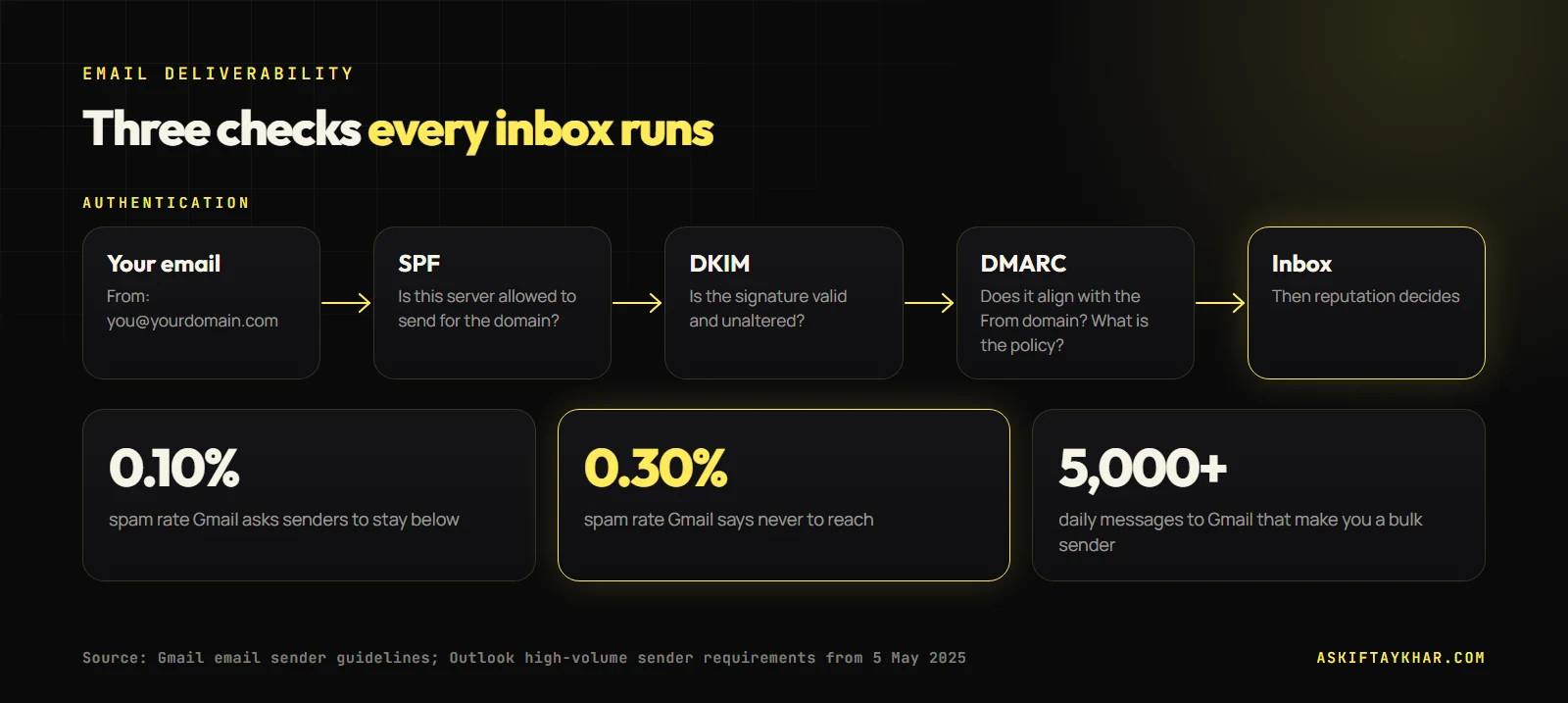
When your email arrives at Gmail or Outlook, the receiving server asks two questions. Is this sender really who they claim to be? And do people who receive their mail seem to want it? SPF, DKIM and DMARC answer the first question.

Email deliverability diagram showing SPF, DKIM and DMARC authentication checks and Gmail spam rate thresholds of 0.10% and 0.30%
Authentication gets you through the door; spam complaints decide whether you stay. Gmail's line is 0.1%, and 0.3% is the limit.

SPF: who is allowed to send

SPF (Sender Policy Framework) is a DNS record on your domain that lists the servers allowed to send email for it. If your newsletter goes out through one platform and your invoices through another, both need to be in the list. A typical record looks like this:

v=spf1 include:_spf.google.com include:sendgrid.net ~all

Keep it to one SPF record per domain. Two separate SPF records is a common mistake, and it breaks SPF entirely.

DKIM: a signature on every message

DKIM (DomainKeys Identified Mail) adds a cryptographic signature to each email. Your sending platform holds a private key, and you publish the matching public key in DNS. The receiving server checks the signature, which proves the message came from an authorised sender and was not altered on the way.

DMARC: the policy that ties it together

DMARC tells receiving servers what to do when a message fails SPF and DKIM, and it checks alignment: whether the domain in the visible “From” address matches the domain that passed SPF or DKIM. A starting record looks like this:

v=DMARC1; p=none; rua=mailto:dmarc-reports@yourdomain.com

The p=none policy means “monitor only”. It satisfies the current Gmail and Outlook requirements, and the reports it produces show you every service sending mail as your domain. Once those reports look clean, you can move to p=quarantine and later p=reject, which stops other people spoofing your domain.

The sender rules Gmail, Yahoo and Outlook now enforce

For years, authentication was best practice. It is now a requirement for anyone sending at volume.

  • Gmail: from 1 February 2024, senders of 5,000 or more messages a day to Gmail accounts must set up SPF, DKIM and DMARC, keep the From domain aligned, and support one-click unsubscribe for marketing and subscribed messages. Yahoo announced matching requirements at the same time.
  • Outlook.com: from 5 May 2025, Microsoft began enforcing SPF, DKIM and DMARC (at least p=none, aligned) for domains sending more than 5,000 emails a day to Outlook.com, Hotmail.com and Live.com addresses.
  • Everyone else: even below those volumes, Gmail asks all senders to authenticate with at least SPF or DKIM. Being under the threshold is not a reason to skip it.

The 0.3% rule for email deliverability

Authentication gets you through the door. Reputation decides whether you stay. The most important reputation signal is how often recipients mark your email as spam.

0.10%spam rate Gmail asks senders to stay belowSource: Gmail sender guidelines
0.30%spam rate Gmail says you should never reachSource: Gmail sender guidelines
5,000daily messages to Gmail that make you a bulk senderSource: Gmail sender guidelines

A 0.3% spam rate means three complaints for every thousand emails delivered. That is not many. A single badly targeted campaign to an old list can cross it. Gmail’s Postmaster Tools shows your domain’s spam rate for free once you verify the domain, and it is the first dashboard I set up for any client who sends volume.

Protect your main domain from cold outreach

If you do cold email, never send it from the domain that handles your invoices, customer support and newsletter. Cold outreach carries a higher complaint risk by nature. When it hurts reputation, you want the damage contained.

I set up a separate domain for outreach (for example, a variation of the brand name), authenticate it fully, warm it up gradually, and keep daily volume per inbox modest. The structure of the sequence itself is covered in the cold email sequence that books meetings.

Autoresponders: the risk nobody thinks about

Back to that contact form. An automatic reply to a form submission sends email to an address you did not verify. When a bot fills in the form thousands of times, you are sending thousands of messages to random or harvested addresses, which is exactly how spam looks from the outside. The fix on this site was a spam guard in front of the form, so bots never trigger an email at all, plus a queue that retries genuine messages if sending fails instead of losing them. The longer-term step for any site is sending through authenticated SMTP rather than the server’s basic mail function.

If your website sends any automatic email, check it has spam protection in front of it.

My email deliverability checklist for a new client

  1. One SPF record that includes every legitimate sending service.
  2. DKIM enabled in every platform that sends as the domain.
  3. DMARC at p=none with reports going to a mailbox someone reads.
  4. Google Postmaster Tools verified for the domain.
  5. One-click unsubscribe on every marketing email.
  6. A separate, authenticated domain for any cold outreach.
  7. Spam protection on every website form that triggers an email.
  8. A monthly look at DMARC reports and spam rate.

What this means for a growing business

When email is one of several channels, deliverability problems hide easily. At Remotie, a Melbourne agency where I ran email marketing alongside social media, Google Ads, AI automations and business development, keeping outbound and marketing email healthy was part of running the backend growth engine, not a separate IT task.

Deliverability setup and monitoring are part of my email marketing service, and separate outreach infrastructure is built into cold outreach and prospecting. If you want to understand how flows make money once you are landing in the inbox, read the 5 email flows every small brand needs. More about me is on the About page.

Frequently asked questions

Why are my emails going to spam?

The most common causes are missing or broken authentication (SPF, DKIM, DMARC), a high spam complaint rate, sending to old or purchased lists, and sudden volume spikes from a new domain. Check your DNS records first, then your spam rate in Google Postmaster Tools.

Do I need DMARC if I only send a few emails?

Gmail only requires DMARC for senders of 5,000 or more messages a day, but I set it up for every domain. A p=none policy costs nothing, the reports show who is sending as you, and it protects your domain from spoofing once you tighten it.

What spam rate is safe for email marketing?

Gmail asks senders to keep the spam rate reported in Postmaster Tools below 0.1% and never reach 0.3%. Above 0.3%, deliverability to Gmail suffers noticeably.

Should I send cold emails from my main domain?

No. Use a separate, fully authenticated domain for cold outreach so that any complaints affect that domain rather than the one you use for customers, invoices and newsletters.

How do I check if SPF, DKIM and DMARC are set up?

Send an email to a Gmail address, open it and choose "Show original". Gmail shows PASS or FAIL for SPF, DKIM and DMARC at the top. Free DNS lookup tools can also show the records published on your domain.

Keep reading

All articles
Start the conversation

Tell me where
growth is stuck.

Send the brief below or grab a 30-minute discovery slot. You will get a straight answer on whether I can move your numbers, and exactly how.

Send your query

Every field helps me answer properly the first time.