Google Ads for Local Service Businesses: 9 Settings That Quietly Waste Your Budget
Most local Google Ads accounts do not fail because of bad keywords. They fail because of default settings that send money to people outside the area, to the wrong network, or to searches that were never going to buy.
Google Ads for a local business works when the campaign only shows to people who are actually in your service area, searching with buying intent, at times you can answer. Change the location option to Presence, remove the Display Network from Search campaigns, add negative keywords and call assets, and count only real enquiries as conversions.
Key takeaways
Google's default location option also targets people who are only interested in your area, not in it. Switch local campaigns to Presence.
Keep Search campaigns on Search. Test search partners separately and remove Display from Search campaigns.
Broad match needs good conversion tracking behind it. Without that, start with phrase and exact match.
Call assets and call reporting matter because many local customers phone instead of filling in a form.
Local businesses have the best raw material in all of paid search. Someone types “phone screen repair near me” or “emergency plumber” and they want to buy today. Intent does not get much stronger than that.
So why do so many local campaigns feel like a slot machine? Most of the time the answer is not the keywords. It is the settings underneath them. Google Ads for local business goes wrong in the same nine places again and again, and most of them are defaults that Google sets when you click through campaign creation.
Here is each one, what it does, and what I change it to.
1. The location option that targets people outside your area
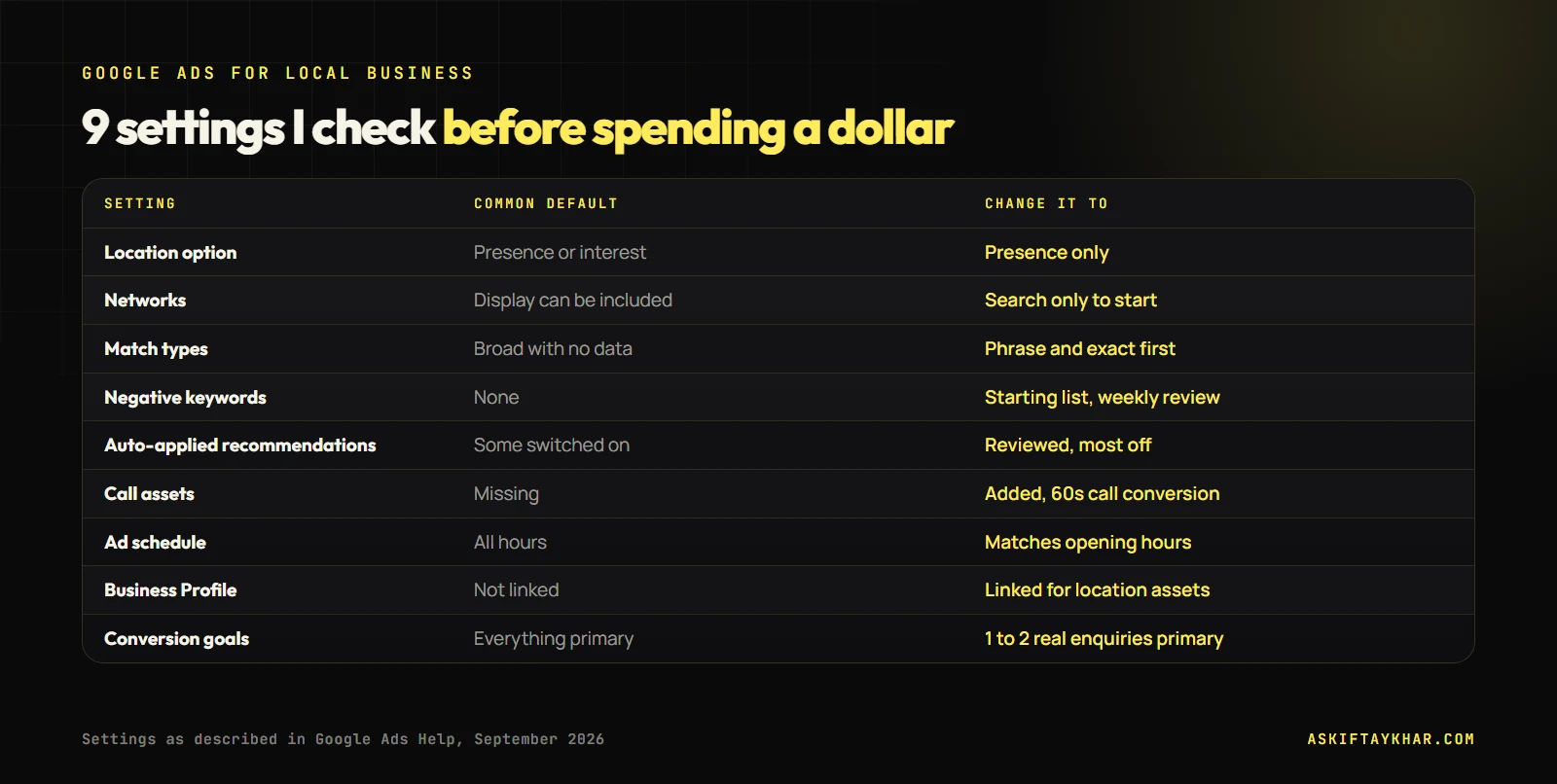
When you choose a location, Google’s default option is “Presence or interest”, described as people in, regularly in, or who have shown interest in your included locations. For a national brand that can make sense. For a repair shop in one shopping centre, “interest” means someone in another city reading about your suburb can trigger your ad.
For almost every local service campaign, I switch the location option to “Presence: people in or regularly in your included locations.” Google notes that most campaigns see fewer impressions after this change. That is the point: you stop paying for people who cannot become customers.
The nine settings I check on every local Google Ads account before spending a dollar.
2. Display Network switched on inside a Search campaign
New Search campaigns can come with the Display Network included. That means your text ads and budget can leak into banner placements on websites and apps, where intent is far lower. Display has its uses, but it should be its own campaign with its own budget and creative, never a checkbox inside Search.
Search partners are a separate choice. They extend your ads to other search sites. I usually start with them off for a small local budget and test them later in a controlled way.
3. Broad match without the data to support it
Broad match lets Google show your ad for searches related to your keyword, including ones you never listed. Google recommends pairing it with Smart Bidding, because the bidding system uses conversion data to decide which of those loose matches are worth it.
The problem is when broad match runs on an account with no reliable conversion tracking. Google then has nothing to learn from, and “phone repair” can wander into “phone repair course” or “how to fix my phone myself”. Until tracking is solid, I start local campaigns on phrase and exact match and expand once real conversion data exists. How to get that data right is covered in my Google Ads conversion tracking checklist.
4. No negative keywords
Every local service attracts a predictable set of searches that will never buy: jobs, courses, DIY instructions, free, second-hand parts, competitor brand names you do not want to bid on. I build a starting negative list before launch and then review the search terms report weekly for the first month.
5. Auto-applied recommendations you never approved
Google Ads can apply some recommendations automatically, including adding keywords or changing bidding. Some are helpful. Several quietly widen your reach in ways that do not suit a local budget. I review the auto-apply settings on every account I take over and switch off anything I would not approve by hand.
6. Missing call assets and call reporting
Many local customers never fill in a form. They tap to call. If your ads have no call asset, you make that harder. If you have no call reporting, you cannot tell which calls came from which keyword.
Google’s call conversions let you count a call as a conversion once it passes a minimum call length that you set. I start most service businesses at 60 seconds, because it filters out wrong numbers and hang-ups while keeping real enquiries.
7. Ads running while nobody can answer
If your ad promises a fast response and the phone rings out at 9 pm, you paid for a click and taught a customer that you are unreachable. I set an ad schedule that matches opening hours, or at least reduces bids heavily outside them, and I route after-hours enquiries to a form with an automatic acknowledgement.
8. No link to the Google Business Profile
Linking your Google Business Profile lets location assets show your address, distance and opening hours inside the ad. For “near me” searches, that proximity information is often the reason someone chooses you over the result above.
9. Counting the wrong things as conversions
If page views, button clicks and genuine enquiries are all counted as primary conversions, both your reports and your bidding are built on noise. I keep one or two primary conversion actions that represent real enquiries, and set everything else to secondary so it is observed but not optimised toward.
A note on ad copy
Responsive search ads let you add up to 15 headlines and 4 descriptions. Use the space: include your suburb or service area, your fastest turnaround, a proof point such as reviews, and the exact service name people search for. Pin only what must stay fixed, such as a licence number, because heavy pinning reduces the combinations Google can test.
How much budget Google Ads for local business really needs
Settings decide where the money goes. Budget decides whether there is enough data to learn anything. I plan local budgets backwards from enquiries, not forwards from a round number.
Cost per enquiry = average cost per click / conversion rate Monthly budget = enquiries you want per month x cost per enquiry
Say clicks for your main service cost about $4 and one in ten clicks becomes a call or form. Each enquiry costs about $40. If you want 30 enquiries a month to judge which keywords work, you need roughly $1,200 a month. Spend $300 and you will get about seven enquiries, which is not enough to tell a good keyword from a lucky one.
Keyword Planner gives rough cost per click estimates for your area before you spend anything. Treat them as a starting guess and replace them with your own numbers after the first month.
What this looked like for a phone repair store
Phone Mechanic Parramatta is a repair store in Westfield Parramatta. The plan was two acquisition engines feeding one counter: high-intent Google Ads to capture people already searching for a repair, and Meta campaigns to create demand from people who were not searching yet.
A single shopping-centre store is exactly where the settings above matter most. It cannot afford clicks from the other side of the country, calls outside trading hours or searches from people wanting to fix their own phone. The case study also shows both engines reported against the same counter’s jobs, which is the only honest way to judge which one is doing the work.
My first-week checklist for a local Google Ads account
Location option set to Presence, with a radius or suburb list that matches real travel time.
Display unticked in Search campaigns; search partners off to start.
Phrase and exact match until conversion tracking is trustworthy.
A starting negative keyword list, then a weekly search terms review.
Call assets with call reporting and a 60-second call conversion.
Ad schedule aligned to opening hours.
Google Business Profile linked for location assets.
One or two primary conversion actions, everything else secondary.
Google is only one half of local demand. People who have never searched for you can still become customers when they see you at the right moment on Instagram or Facebook, which is where Meta marketing comes in. For the search side, this is exactly the setup work inside my Google Ads management service. You can read more about me on the About page.
What is the best location setting for local Google Ads?
For most local service businesses, use "Presence: people in or regularly in your included locations". The default "Presence or interest" also reaches people who are only interested in your area, which wastes budget when you can only serve customers nearby.
How much should a local business spend on Google Ads?
Start from the cost per click in your area, which Keyword Planner can estimate, and the number of enquiries you need. If a click costs $4 and one in ten clicks becomes an enquiry, each enquiry costs about $40. Budget for enough enquiries a month to learn from, and scale once you know which keywords convert.
Should I use broad match keywords for a local business?
Only once conversion tracking is reliable and you are using Smart Bidding. Without good conversion data, broad match drifts into irrelevant searches. Phrase and exact match are safer while you build that data.
Should local businesses use Performance Max?
It can work, but only with solid conversion tracking, a linked Google Business Profile and enough budget for it to learn. For a small local budget, a well-built Search campaign is usually the better first step.
Why is my Google Ads phone not ringing?
Check four things: the location option, whether the ads run during opening hours, whether call assets are active, and the search terms report. Most silent campaigns are either showing to the wrong area or matching searches that were never going to call.
Target CPA and Target ROAS can only optimise toward what you measure. If your conversion tracking counts the wrong things, Smart Bidding will get very good at buying the wrong things. Here is the checklist I run first.
 Iftaykhar MahmudGrowth marketer, Dhaka