Skip to content

Before You Trust Smart Bidding: The Google Ads Conversion Tracking Checklist

Target CPA and Target ROAS can only optimise toward what you measure. If your conversion tracking counts the wrong things, Smart Bidding will get very good at buying the wrong things. Here is the checklist I run first.

Google Ads conversion tracking checklist cover for Smart Bidding, 30 conversions guideline, by Iftaykhar Mahmud
On this page
  1. How Smart Bidding uses your conversion data
  2. The Google Ads conversion tracking checklist
  3. The tracking faults that cost the most
  4. How to test your Google Ads conversion tracking
  5. How this plays out in real accounts

Short answer

Google Ads conversion tracking should record only the actions that mean real business value, with sensible values, deduplication and enhanced conversions switched on, and ideally qualified leads or sales imported from your CRM. Smart Bidding needs that clean data: Google recommends judging it over a period with at least 30 conversions, or 50 for Target ROAS.

Key takeaways

  • Smart Bidding learns from your conversion data, so bad tracking becomes bad bidding.
  • Keep one or two primary conversion actions that represent real value and set the rest to secondary.
  • Google reports a median conversion rate increase of 5% on Search and 17% on YouTube for early adopters of enhanced conversions.
  • Import qualified leads or sales from your CRM so bidding optimises toward revenue, not form fills.
Smart Bidding is one of the most powerful tools in Google Ads, and one of the most misunderstood. Owners switch to Target CPA or Maximise Conversions, costs drift, lead quality drops, and the conclusion is that “automation doesn’t work for us”.

Usually automation is working perfectly. It is optimising toward exactly what it was told to value. The problem is that nobody checked what it was told. Google Ads conversion tracking is the instruction manual Smart Bidding reads, and if the manual says a page view is as valuable as a paying customer, the system will happily buy page views.

This is the checklist I run before I let any bidding strategy spend money on its own.

How Smart Bidding uses your conversion data

Smart Bidding strategies such as Target CPA, Target ROAS, Maximise Conversions and Maximise Conversion Value set a bid for every auction based on how likely that search is to lead to a conversion. The only definition of “conversion” they know is the one in your account.

Google’s own guidance reflects how much data this needs. When evaluating Smart Bidding, Google recommends measuring over a period that includes at least 30 conversions, or 50 for Target ROAS, and its Target ROAS documentation sets a minimum conversion history before the strategy can be used on Search. Fewer, cleaner conversions beat many noisy ones, because every noisy conversion teaches the model something false.

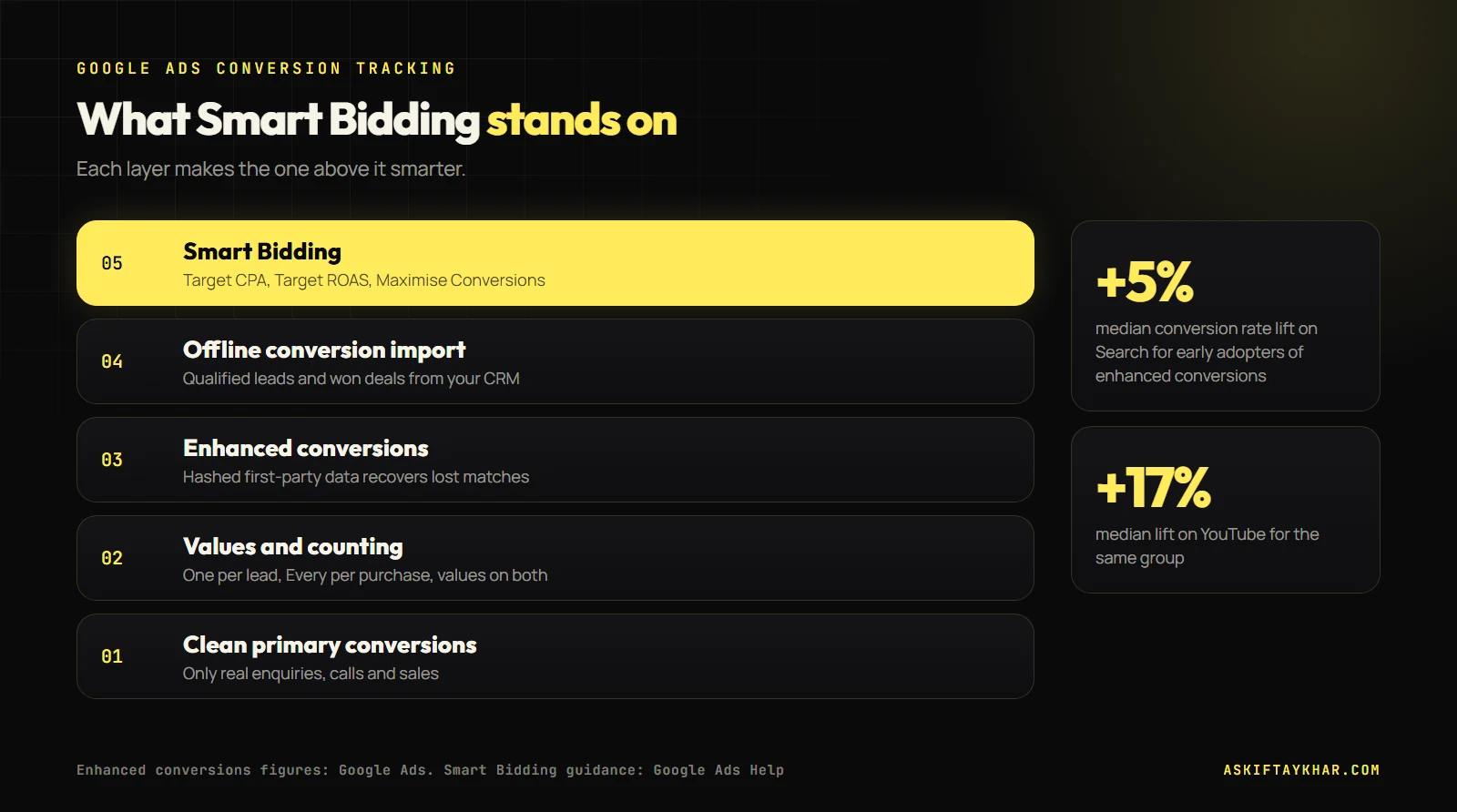
Diagram of the Google Ads conversion tracking layers under Smart Bidding: primary conversions, values, enhanced conversions and offline conversion import
Smart Bidding is only as good as the layers beneath it. Google reports median conversion rate lifts of 5% on Search and 17% on YouTube from enhanced conversions.

The Google Ads conversion tracking checklist

1. One or two primary conversion actions

Google Ads lets you mark each conversion action as primary or secondary. Primary actions feed bidding. Secondary ones are observed only. I keep primary for the actions that represent real value, such as a submitted enquiry, a qualified call or a purchase, and move everything else to secondary: page scrolls, button clicks, video views, “contact page visited”.

2. The right counting setting

Each conversion action is counted as “Every” or “One” per click. Purchases should usually count every time. Leads should usually count once, because one person submitting the same form three times is still one lead. Getting this wrong inflates lead numbers and misleads bidding.

3. Values, even for leads

Even if you do not sell online, give conversions a value. If one in four enquiries becomes a job worth $400 on average, an enquiry is worth about $100 to you. Values let you move to value-based bidding later and help Google tell a high-value service from a cheap one.

4. Enhanced conversions switched on

Enhanced conversions send hashed first-party data, such as the email address a customer typed into your form, alongside the conversion. That helps Google match conversions it would otherwise lose to cookie restrictions and device switching.

+5%median conversion rate increase on Search for early adopters of enhanced conversionsSource: Google Ads
+17%median conversion rate increase on YouTube for the same groupSource: Google Ads

Those are Google’s reported figures, not a guarantee, but the setup takes minutes in most accounts and there is little reason to skip it.

5. Offline conversion import for lead generation

For service businesses, the most valuable step is importing what happened after the form. Capture the click ID (GCLID) in a hidden form field, store it in your CRM with the lead, and upload the outcome: qualified, quoted, won. Now Smart Bidding can learn which searches produce customers rather than which produce form fills.

This is also where most lead generation accounts find their biggest waste. Keywords that generate lots of cheap, unqualified leads look great until the sales outcome is attached to them.

6. Calls tracked properly

If customers phone you, track calls from ads and calls from your website with a minimum call length that you choose, so hang-ups do not count. I start most service businesses at 60 seconds and adjust once I can see which calls turn into jobs.

If you advertise to users in the European Economic Area or the UK, your consent banner needs to pass consent signals to Google through consent mode. Google has required consent signals for EEA traffic since March 2024 for measurement and personalised advertising. Without them, conversions from those users can go missing.

8. Data-driven attribution

Google Ads uses data-driven attribution by default for most conversion actions, and in 2023 it removed the older rules-based models such as first click and linear. Check that your main conversions use it, and that your conversion window matches how long customers take to decide.

The tracking faults that cost the most

Some tracking problems are cosmetic. These four change what Smart Bidding buys, so I look for them first.

  • Duplicate tags. The same conversion fired by Google Tag Manager and by a hard-coded tag, or by both the thank-you page and a form listener. Every lead counts twice and the system thinks the account converts better than it does.
  • Thank-you pages anyone can reach. If the conversion fires on a page that also appears in the site navigation or search results, visits that are not conversions get counted.
  • Imported goals from analytics that measure engagement. Session duration or pages per visit imported as primary conversions will pull bidding toward curious browsers.
  • Micro-conversions marked as primary. A click on the phone number is not a call. A click on “Get a quote” is not a quote request. Keep them as secondary signals.

A quick way to spot these is to compare the conversion count for a week against the number of real enquiries in your inbox or CRM for the same week. If Google reports noticeably more conversions than you have enquiries, something is double counting.

How to test your Google Ads conversion tracking

Once a quarter, and after every website change, I run the same test:

  1. Click your own ad from a test search, complete the enquiry or purchase, and note the time.
  2. Confirm the conversion appears in Google Ads the next day, attributed to the right campaign.
  3. Compare a month of Google Ads conversions with your CRM or sales records. Expect a gap, but a stable one.
  4. Check the diagnostics for enhanced conversions and offline imports in the conversion action details.

How this plays out in real accounts

When one business runs two paid channels, conversion definitions have to match. For Phone Mechanic Parramatta, Google Ads captured high-intent repair searches while Meta created new demand, and both engines were reported against the same counter’s jobs. That only works when “a job” means the same thing in both systems.

At Remotie, a Melbourne growth agency where I ran the backend growth engine, Google Ads sat alongside email, social media, AI automations and business development. With five channels under one owner, clean conversion definitions are what make the reporting comparable, and the case study describes how reporting and follow-up were automated with AI task workflows.

My order of operations before switching on Smart Bidding

  1. Audit every conversion action: primary or secondary, Every or One.
  2. Add values to the primary actions, even rough ones.
  3. Switch on enhanced conversions and confirm the diagnostics are healthy.
  4. Set up GCLID capture and a monthly offline import of qualified leads.
  5. Run on Maximise Conversions or manual bidding until the account has consistent conversion history, then set a realistic Target CPA based on actual results.

If your ads send traffic to a website that cannot capture the GCLID or pass form data cleanly, the website is part of the problem, and I fix that inside website build and design. The full setup is part of my Google Ads management. For the equivalent on Meta, read the Meta Conversions API guide, and for the settings side of local campaigns, see 9 settings that waste local Google Ads budget. More about me is on the About page.

Frequently asked questions

How many conversions does Smart Bidding need?

Google recommends evaluating Smart Bidding over a period that includes at least 30 conversions, or 50 for Target ROAS, and Target ROAS has a minimum conversion history before it can be used. Accounts with fewer conversions can still use Maximise Conversions, but results will be less stable.

What are enhanced conversions in Google Ads?

Enhanced conversions send hashed customer data from your conversion page, such as an email address, to help Google match conversions it would otherwise miss. Google reports a median conversion rate increase of 5% on Search and 17% on YouTube for early adopters.

Should I count leads as Every or One?

Usually One. A person who submits the same form twice is one lead. Purchases are usually counted as Every, because each order has its own value.

What is offline conversion import?

It is uploading outcomes that happen after the click, such as a qualified lead or a closed sale, back into Google Ads. You store the click ID from the ad with each lead and upload the outcome, so bidding learns which searches lead to real customers.

Why did my costs go up after switching to Target CPA?

Often because the target was set lower than the account's real cost per conversion, or because the conversion data included low-value actions. Set the target close to your recent actual cost per conversion and clean up primary conversions before tightening it.

Keep reading

All articles
Start the conversation

Tell me where
growth is stuck.

Send the brief below or grab a 30-minute discovery slot. You will get a straight answer on whether I can move your numbers, and exactly how.

Send your query

Every field helps me answer properly the first time.