AI Automation for Small Businesses: 7 Workflows Worth Building First (and 3 to Leave Alone)
Most small businesses do not need an AI strategy. They need three or four boring tasks to stop eating their week. These are the seven workflows I automate first, and the three I deliberately keep human.
 Iftaykhar MahmudGrowth marketer, Dhaka
Published 5 min read
On this page
Short answer
AI automation for a small business means connecting your tools so repetitive work, such as logging leads, replying to enquiries, writing meeting notes or building reports, happens automatically, with AI handling the reading and drafting. Start with high-volume, low-risk tasks, keep a human check on anything customer-facing or financial, and measure the hours saved.
Key takeaways
- McKinsey's 2026 survey found nearly nine in ten organisations use AI regularly in at least one function, but only 44% say it is scaling across the enterprise.
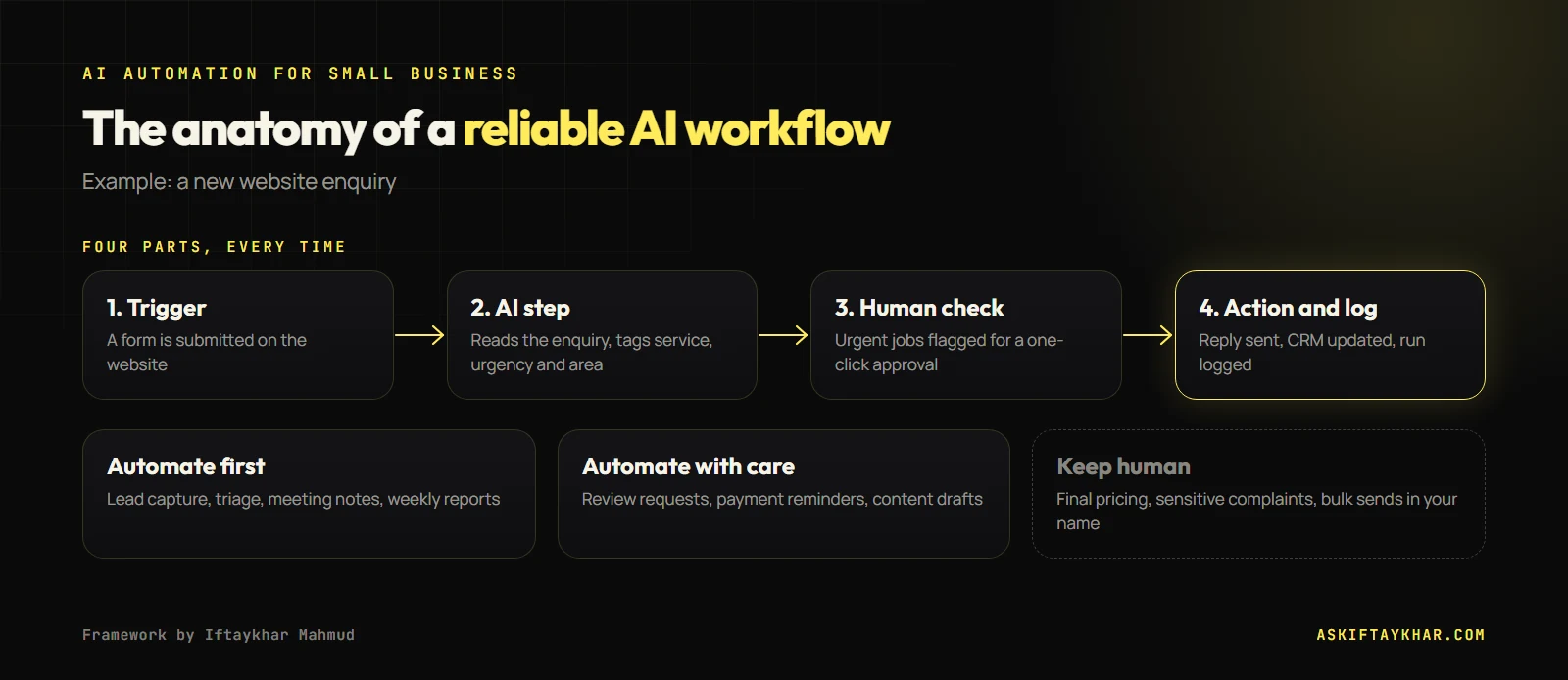
- The best first automations are frequent, repetitive and low risk: lead capture, enquiry triage, meeting notes, reporting.
- Keep humans on pricing, sensitive complaints and anything sent at scale in your name.
- Build each workflow with a trigger, an AI step, a human check where needed, and a logged action.
Frequently asked questions
What is AI automation for small business?
It is connecting your everyday tools so repetitive tasks happen automatically, with AI doing the reading, sorting and drafting that used to need a person. Typical examples are logging leads, sorting enquiries, writing meeting notes and sending reminders.
Which AI automation tools should a small business use?
Make, Zapier and n8n are the common platforms for connecting apps without code, combined with an AI model such as ChatGPT or Claude for the reading and writing steps. Choose based on the apps you already use and who will maintain the workflows.
Is it safe to use AI with customer data?
It can be, if you check each tool's data handling terms, avoid sending more personal data than a task needs, use business accounts rather than personal ones, and keep a human check on anything customer-facing.
How long does it take to set up an AI workflow?
A simple workflow such as lead capture with an instant reply can be built in a day. More complex ones that touch several systems take longer, and every workflow should run alongside the manual process for a week before you rely on it.
What should I not automate with AI?
Final pricing, sensitive complaints and anything sent at scale in your name without review. AI can prepare and summarise those, but a person should make the final call.
Keep reading
All articles
AI Automation
Speed to Lead: How an AI Follow-Up System Stops Paid Leads From Going Cold
You can pay for a great lead and still lose it by replying tomorrow. Harvard research on 2,241 companies shows how fast leads go cold. Here is the follow-up system I build so no enquiry waits.